
LunaTranslator - Open-source GalGame Translator
LunaTranslator setup guide — open-source GalGame and visual novel translator with HOOK, OCR, and AI-powered translation. Integrate with Nova Router for enhanced accuracy.
Chat Settings Options
In the Nova Router console's System Settings -> Chat Settings, you can add the following shortcut option for one-click population into LunaTranslator on the Token Management page:
{ "LunaTranslator": "lunatranslator://llmapi/base64?data={cheryConfig}" }LunaTranslator is an open-source and free visual novel (GalGame) translator, dedicated to providing a native-level visual novel gaming experience.
- Project Address: https://github.com/HIllya51/LunaTranslator
- Project Documentation: https://docs.lunatranslator.org
Feature Support
-
HOOK Primarily uses HOOK to extract game text, adapting to almost all common and niche visual novels.
-
In-game Translation Some games can also have translations directly embedded in-game for an immersive experience.
-
HOOK Emulator For most games on NS/PSP/PSV/PS2, HOOK emulator is supported to directly read game text.
-
OCR Built-in high-precision OCR models, and supports many other online & offline OCR engines for flexible reading of any text.
-
Rich Translation Interfaces Supports almost all translation engines, including large language model translation, offline translation, etc.
-
Language Learning Supports Japanese word segmentation and kana furigana, AnkiConnect, and Yomitan plugin.
-
Speech Synthesis Supports a large number of online & offline speech synthesis engines.
-
Speech Recognition On Windows 10 and Windows 11, Windows Speech Recognition can be used.
Installation
Download and install from LunaTranslator Documentation - Download & Launch & Update
Integrating Nova Router into LunaTranslator
LunaTranslator supports integrating with locally deployed Nova Router instances and third-party compatible services.
One-Click Configuration
-
In the Nova Router console's
System Settings->Chat Settings, add the following shortcut option:{ "LunaTranslator": "lunatranslator://llmapi/base64?data={cheryConfig}" }- Open
System Settingsin the Nova Router console - Go to
Chat Settings - Add a new shortcut entry named
LunaTranslator - Paste the
lunatranslator://...link above into the target URL or shortcut value field - Save the setting and make sure the shortcut is available
- Open
-
In
NovaRouter->Console->Token Managementtab, select the token to be used in LunaTranslator, click the dropdown option next to the chat button, selectLunaTranslator, and it will jump to LunaTranslator and automatically configure the API address and API Key.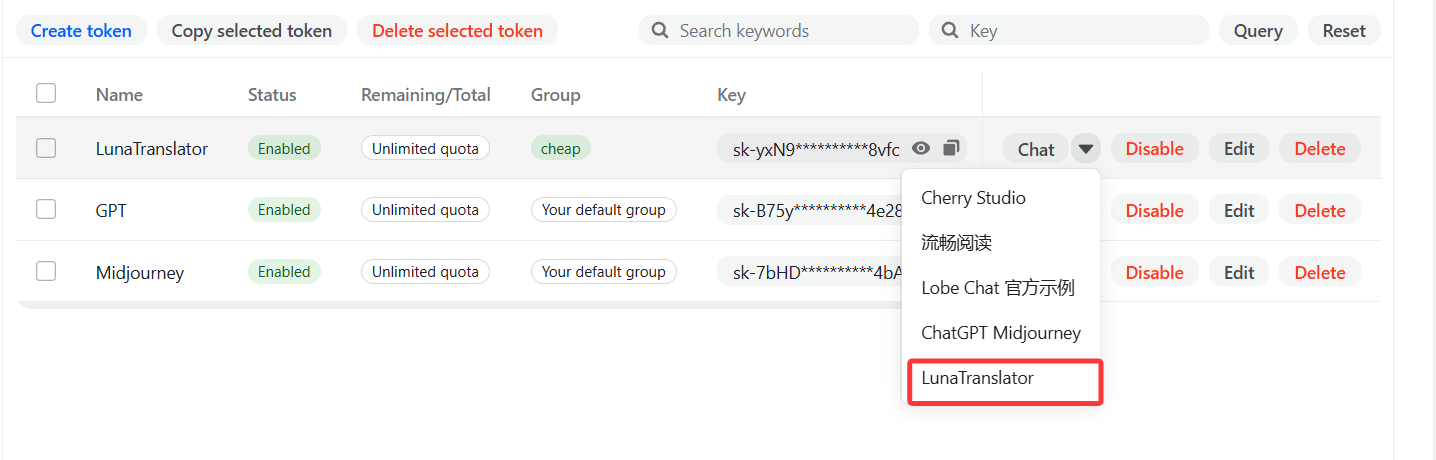
-
In
LunaTranslator->Settings->Translation Settings->Large Models, a new large model interface configuration will appear; click Edit. -
Click the refresh button next to the model dropdown box to get the Nova Router platform's model list, select or enter the model name, then click OK to save.
-
Check whether the toggle next to the newly added large-model interface configuration is enabled. If not, enable it to start using it.
Manual Configuration
-
In
NovaRouter->Console->Token Managementtab, obtain the API Key.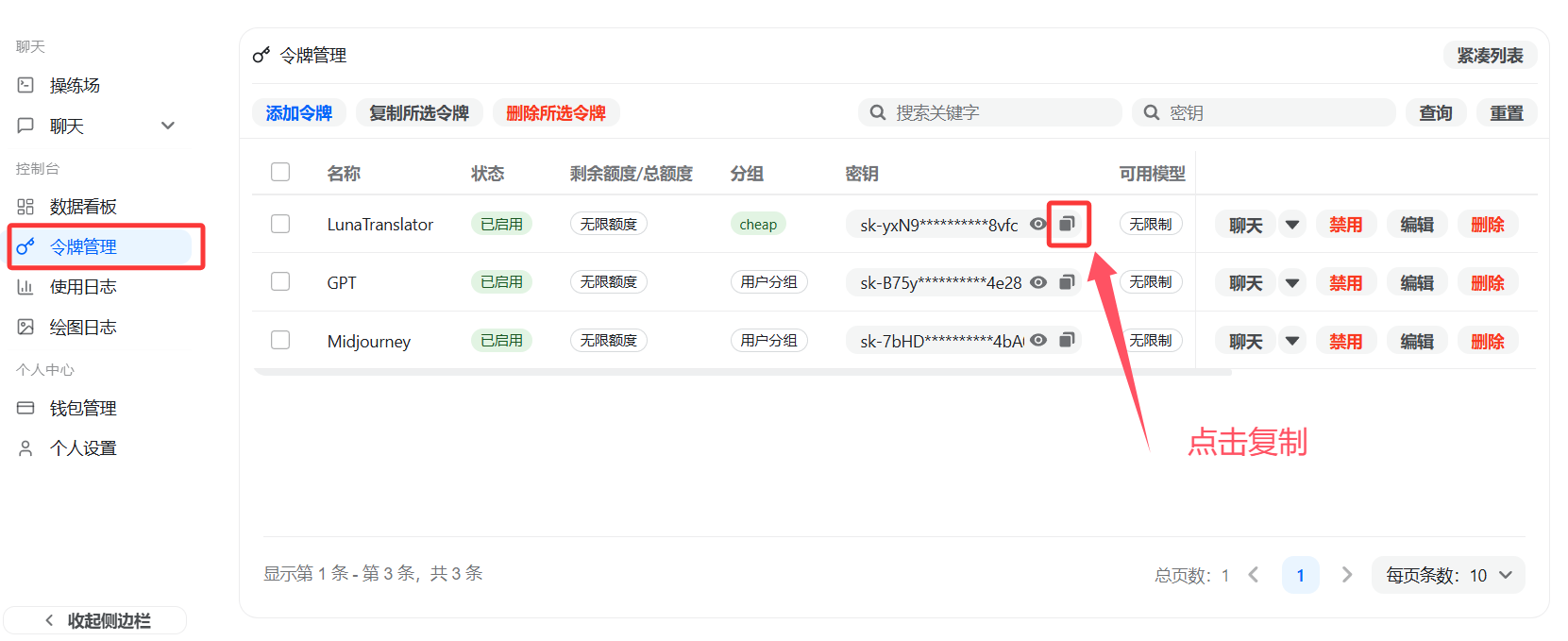
-
In
LunaTranslator->Settings-Translation Settings->Large Models, select Add. -
Copy the Large Model General Interface template and add a new interface.
-
In the newly added interface, fill in the corresponding API address and API Key.
Field What to enter API Address Enter your Nova Router endpoint, usually ending with /v1API Key Paste the key copied from the Nova Router console Model Name Refresh the model list and select one, or enter an exposed model manually -
Click the refresh button next to the model dropdown box to get the Nova Router platform's model list, select or enter the model name, then click OK to save.
-
Click the toggle button next to the newly configured interface to enable it and start using it.
How to confirm it worked
- A new interface appears in the
Large Modelslist - Refreshing can fetch the available model list
- After enabling the toggle, translation requests return results normally
For more usage methods, please refer to the LunaTranslator official documentation: LunaTranslator Documentation - Large Model Translation Interface
How is this guide?
LangBot - Instant Messaging Bot Development Platform
LangBot integration guide — build AI-powered chatbots for Feishu, DingTalk, Telegram, Discord, and more. Supports Knowledge Base, Agent, and MCP with Nova Router.
AstrBot - Agent Chatbot
AstrBot setup guide — integrate this open-source Agent chatbot platform with Nova Router to power QQ, Feishu, DingTalk, WeChat Work, and more with AI capabilities.